MyDocSafe for Probate
Open a new estate from your own website in minutes, collect ID and documents in one guided journey, and keep every family's matter completely separate from every other.
A probate matter runs for six to twelve months. Most of that time is spent waiting.
- Chasing paperwork by email, over and over, across a matter that lasts the best part of a year.
- No single view of what each family has returned and what is still outstanding.
- Manual set-up for every estate you take on: a folder, an email thread, a row on a spreadsheet.
- The risk, every time you send something, that one family sees another family's documents.
Open a new estate from your own website
A bereaved executor should be able to click Get Started on your website at eleven at night and land inside a secure portal with your first form already open. Nobody at the firm has to touch anything for that to happen.
Each portal group has a self-signup link. You put it behind the Get Started button on your own site. Anyone who uses it gets their own portal and their own account, and automatically receives the group's default onboarding workflow. There is no staff assignment step and no manual invite.
Your team finds out immediately. Portal self-signup notifications, under Personal Settings → Notification settings → Portal notification settings, tell you the moment a new estate arrives. Each team member controls their own.
How self-signup and onboarding fit together

Every new client completes intake before anything else
Intake either gets done or the matter stalls. MyDocSafe makes the first step compulsory rather than hopeful.
Mark one finished, visible workflow as Default for new invitees, using the three-dot menu on the Workflow templates page; a star appears next to its name. A client who is invited by hand or who self-registers is taken straight into that workflow on first login, and cannot open any other part of the portal until it is complete. They are returned to it on every login until they finish. ID checks, your terms, the executor declaration and the first document request are all done before the client browses anything.
Existing clients are never forced into it, and neither are your own staff. A client's onboarding workflow can also be changed or removed later in Manage Access, without deleting and re-inviting them.
For the administration itself, build one template per stage, keep those templates invisible, and place a copy into one client's portal when that estate reaches that stage: Workflows → + → Create from template → Send workflow. Each family sees only their own stages. Workflows do not chain: a team member sends the next stage, or you combine stages in a single workflow separated by a message step.
More on client onboardingYour team knows what happened without logging in
Nobody on your team has to log in to find out whether the family has done anything.
Portal workflow completed is a notification anyone on the team can subscribe to, in Portal notification settings. In-app notifications are on by default, email is opt-in, and each team member chooses their own. Documents uploaded through an Upload documents step raise a notification too, so a death certificate or a grant of probate is seen as it arrives.
Workflow event emails carry your firm's branding, name the client who triggered them along with their email address, and link straight to that client's own run. You also choose exactly who is emailed when a client's portal status changes, which turns that status into a stage tracker as an estate moves through your own probate stages.
Where a workflow has a deadline set in days, the count starts the moment it is sent, and the client sees the deadline before they open it.

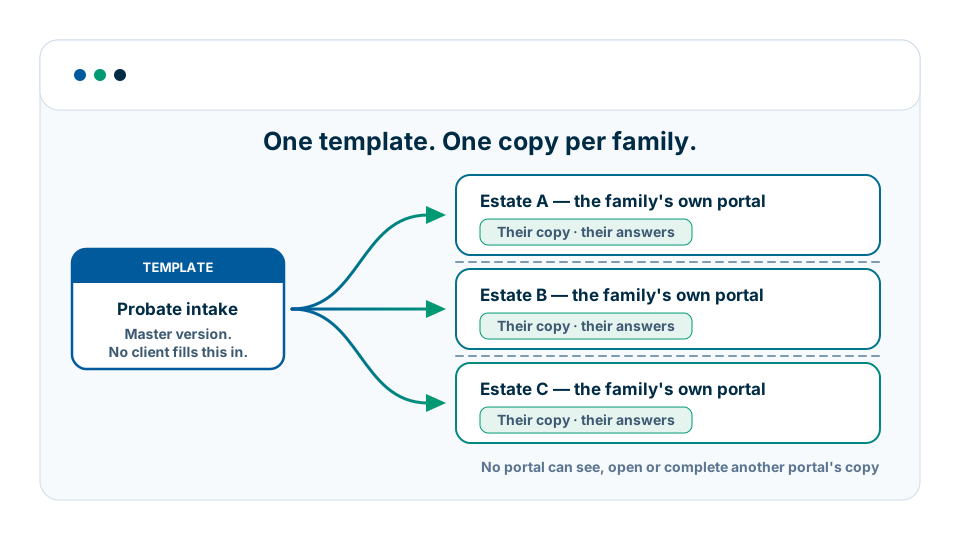
One family, one portal, one record
Probate buyers test one thing above all others: that one family's workflow, document or answer can never be visible to another. Here is exactly how it works.
A template is the master version, and clients never fill it in. Every client works on their own copy, held inside their own portal. No other client can see it, open it or complete it. Editing a template later does not change copies that already exist.
That holds however the copy comes about: whether you send the workflow, create one from a template inside the family's portal, or they start a visible workflow themselves, the copy belongs to that one portal.
So two families going through the same process at the same time have two entirely separate records. One family's answers, uploads and signatures are never listed in another family's portal.
This is the part prospects usually get wrong: visibility is a group-wide setting. It answers “can clients see this workflow?” for the whole portal group at once. Per-client separation is achieved with copies, not with visibility.
Completed workflows stay in the client's portal as the client's own record of what they submitted and signed, which is also your audit trail.
You do not have to take our word for any of it. Start a trial, set up a portal group, and run through it as a client in a second browser.
How to test the experience internallyHow a probate matter runs in MyDocSafe
From the first click on your website to a closed matter the family can still open.
-
1
Get Started
The executor clicks Get Started on your website and follows your portal group's self-signup link. No call first, and nothing for your team to process.
-
2
Self-registration
They create their own account and their own portal in a few minutes, at whatever hour suits them, and receive your group's default onboarding workflow.
-
3
Compulsory intake
Their portal opens straight into that workflow: ID checks, your terms, executor details and the first document request. Nothing else opens until it is finished.
-
4
Stage workflows
As the estate moves, you place a copy of the next stage into that one portal: grant application, asset collection, estate accounts. Each family sees only its own.
-
5
E-signatures and secure delivery
Documents are signed electronically and delivered inside the portal, so nothing sensitive travels as an email attachment to the wrong address.
-
6
Closed matter
When the estate is wound up, the completed workflows stay in the family's portal as their record of everything they submitted and signed.
Security and compliance for probate firms
Estate papers are among the most sensitive documents a family will ever hand over. They are protected accordingly.
Encryption
AES-256 at rest, TLS in transit
Granular access control
Rights set per portal and per document
Key management
Encryption key service for extra protection
UK/EU data residency
Data held in the UK and the EU, under GDPR
Integrates with the tools around it
An open API, viaSocket and Zapier for no-code automation, and Zoho and Xero for CRM and accounts. MyDocSafe sits alongside your case-management system rather than replacing it: the case manager keeps the matter, MyDocSafe handles everything the family has to see, sign or send. Plans and limits are on our pricing page.
Probate questions we are asked most
No. A template is only a master version; every client works on their own copy, held inside their own portal. No other client can see that copy, open it or complete it, so one family's answers, uploads and signatures are never listed in another family's portal. Editing a template afterwards does not change copies that already exist.
Yes. Build the checks into one finished, visible workflow and set it as the default for new invitees. Every new client is taken into it on first login and cannot open any other part of the portal until it is complete. They are returned to it each time they log in until they finish.
Yes, with copies rather than visibility. Keep the stage-specific workflows invisible, then place a copy of the one you need inside a single family's portal. That copy belongs to that portal only and is never listed for anyone else. Visibility itself is group-wide, so it cannot be set for one client.
No. Workflows do not chain, so finishing one does not start the next. A member of your team sends the next stage, which takes seconds from inside the client's portal. If you want a family to run straight through without waiting, put the stages in a single workflow and separate them with a message step.
In the UK and the EU. Documents are encrypted with AES-256 at rest and TLS in transit, and the platform is built to meet GDPR. Electronic signatures are valid under UK and EU law. The security overview sets out the controls in full.
Yes. The portal header, invitation emails and workflow event emails carry your firm's branding, so the family sees your practice rather than ours throughout. Talk to us and we will confirm the plan that covers branding for a firm of your size.
Planning the estate rather than administering it? See MyDocSafe for Estate Planning.
Running probate inside a wider legal practice? See MyDocSafe for Law Firms, or how to automate client onboarding.
Try MyDocSafe for your probate practice
Start a free trial, or book a walkthrough with us. Set up a portal group, invite yourself as a client in a second browser, and see the separation between families for yourself — here is how.