Secure data procurement for professional services firms
Secure Webforms & Questionnaires
Collect, validate and reuse client data securely — from standalone forms to portal-based workflows and signed PDF outputs.
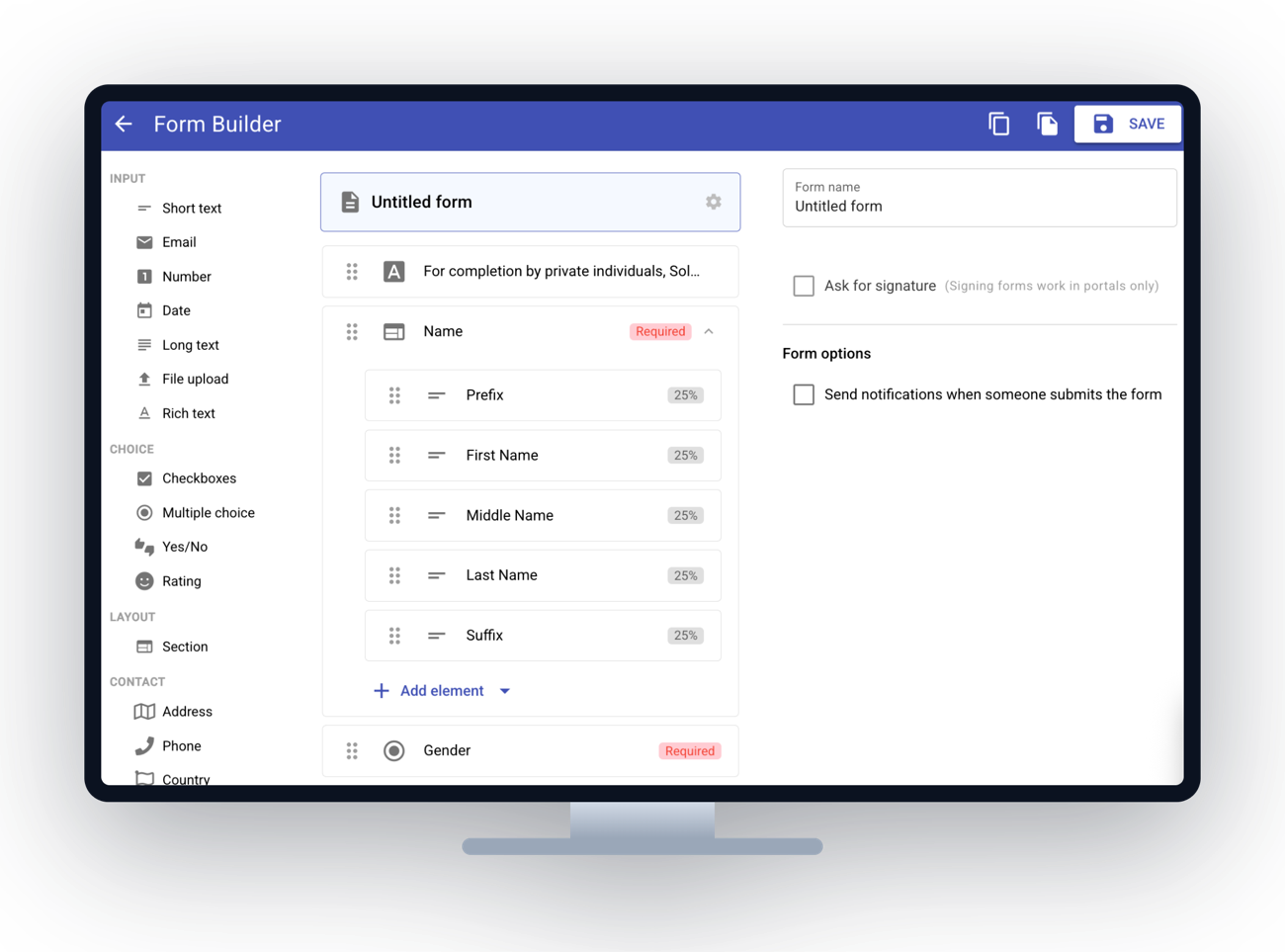
Not survey software — a secure data collection layer
MyDocSafe webforms help firms replace email attachments, Word questionnaires and spreadsheet-based intake with secure, structured data collection. Clients complete forms online, save progress inside their portal, and submit information that can be validated, exported, used in workflows, turned into PDFs, or signed electronically.
Replace email questionnaires with secure data collection
Professional firms often collect sensitive client information through email attachments, spreadsheets and Word documents. MyDocSafe webforms provide a more secure, structured and auditable way to request, validate and collect client data.
- Collect information through secure online forms
- Reduce manual chasing and rekeying
- Keep data collection connected to the client portal
- Use forms as part of onboarding, compliance and operational workflows
Ask the right questions — and get cleaner answers
Use validation rules and conditional logic to make forms easier for clients to complete and more useful for your team. Show relevant questions only, require key information, and reduce avoidable back-and-forth.
- Required fields and format checks (email, dates, numbers)
- Conditional questions and sections that adapt to answers
- Clearer, shorter client journeys
- Better-quality data for internal processing
Turn responses into data, documents and signed records
Form responses should not sit in an inbox. MyDocSafe lets firms use submitted data operationally — by exporting it, saving it to the client record, generating PDFs and, where needed, sending the result for electronic signature.
Export submitted data
Download responses (CSV/Excel-style) as a bridge between client intake and internal processing.
Save to the client record
Keep responses against the secure client portal for access control and auditability.
Generate PDFs on the fly
Turn responses into a PDF for declarations, onboarding summaries, applications and records.
Electronically sign the result
Send the generated PDF for e-signature where confirmation, consent or approval is needed.
Maintain an audit trail
Keep a clear record of what was asked, answered, generated and signed.
Feed workflows
Push validated data into onboarding, compliance and document-collection workflows.
Use webforms on their own, in portals, or inside workflows
MyDocSafe webforms support a range of client-facing processes, from simple data capture to full onboarding journeys.
Standalone forms
Create secure forms for one-off data collection or information requests.
Client portals
Let clients complete, save and return to forms inside their secure portal.
Learn moreQuotes & Proposals
Capture information before or during a proposal journey.
Learn moreWorkflows
Use forms as workflow steps for onboarding, compliance, document collection and approvals.
Learn morePDF + e-signature journeys
Generate a document from responses and ask the client to sign it electronically.
Learn moreClient onboarding
Collect and verify client information as part of a structured onboarding process.
Learn moreCommon use cases
Built for accountants and CPAs, tax preparers, law firms, financial advisors and compliance-led teams.
Webform features
Frequently asked questions
Are MyDocSafe webforms secure?
Yes. Forms are completed through a secure online process rather than email attachments, can be used inside access-controlled client portals, and keep an audit trail of what was submitted — a more secure, structured way to collect sensitive client data.
Can clients save a form and finish it later?
Yes. When forms are used inside a client portal, clients can start a form, save their progress and return later — useful for longer onboarding, tax, compliance and KYC questionnaires.
Can I turn form responses into a signed document?
Yes. Submitted responses can be generated into a PDF on the fly, and where confirmation or consent is needed that PDF can be sent for electronic signature.
Can I export the data clients submit?
Yes. Admins can export submitted form data (CSV/Excel-style) for operational use, bridging client intake and internal processing, or feed it straight into workflows.
Do MyDocSafe webforms work on mobile?
Yes. Forms are mobile-friendly and responsive, so clients can complete intake and confirmation forms from a phone, tablet or desktop.
Build a more secure client data collection process
Use MyDocSafe to collect client information securely, reduce manual chasing, and turn form responses into workflows, documents and signed records.